ROM Bit Extraction & Review

Extract ROM data from die images. Fast.

GPU-accelerated bit classification from semiconductor die photographs. Automatic grid detection, fusion across every capture, one-click review of uncertain bits, and integrated decode — in a single native application.

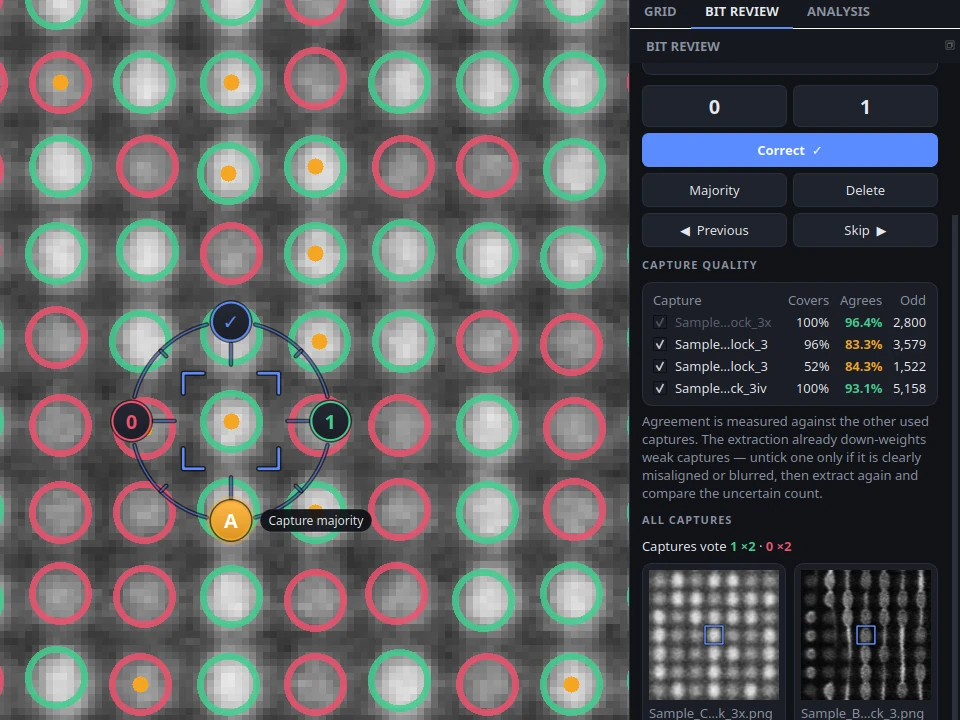
RomScope reviewing an uncertain bit: the reticle offers 0, 1, confirm and capture majority while every capture of the block is shown side by side
50×
GPU vs CPU acceleration
832
Decode configurations tested
5 stages
Image to firmware
0
Manual grid lines needed
Capabilities

Purpose-built for ROM extraction

From raw SEM image to decoded firmware. Every step handled in a single tool.

GPU Extraction eval

CUDA-powered bit classification via PyTorch. Processes millions of sample points in seconds. Transparent CPU fallback.

Automatic Grid Detection eval

FFT-based period detection with sub-pixel refinement. No manual line placement. Handles perspective-distorted dies.

Reticle Review eval

Step through uncertain bits row by row or least certain first, compare every capture side by side, and decide with one click on the reticle: 0, 1, confirm, or capture majority. You set the review threshold.

Multi-Capture Fusion

Stack multiple SEM photos of the same block. Captures are aligned automatically; confidence-weighted merging down-weights blurred or misaligned ones.

Design Rule Checks eval

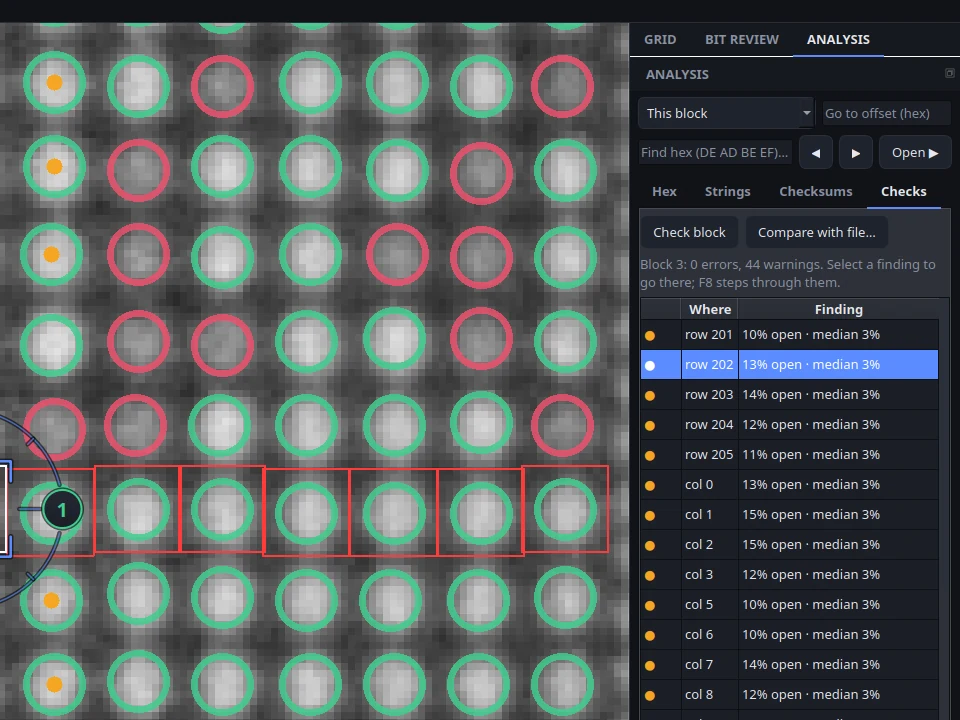
Row/column balance, columns with unusually many uncertain bits, global skew. Findings are marked on the image; F8 steps through them.

832-Config Decode Ranking

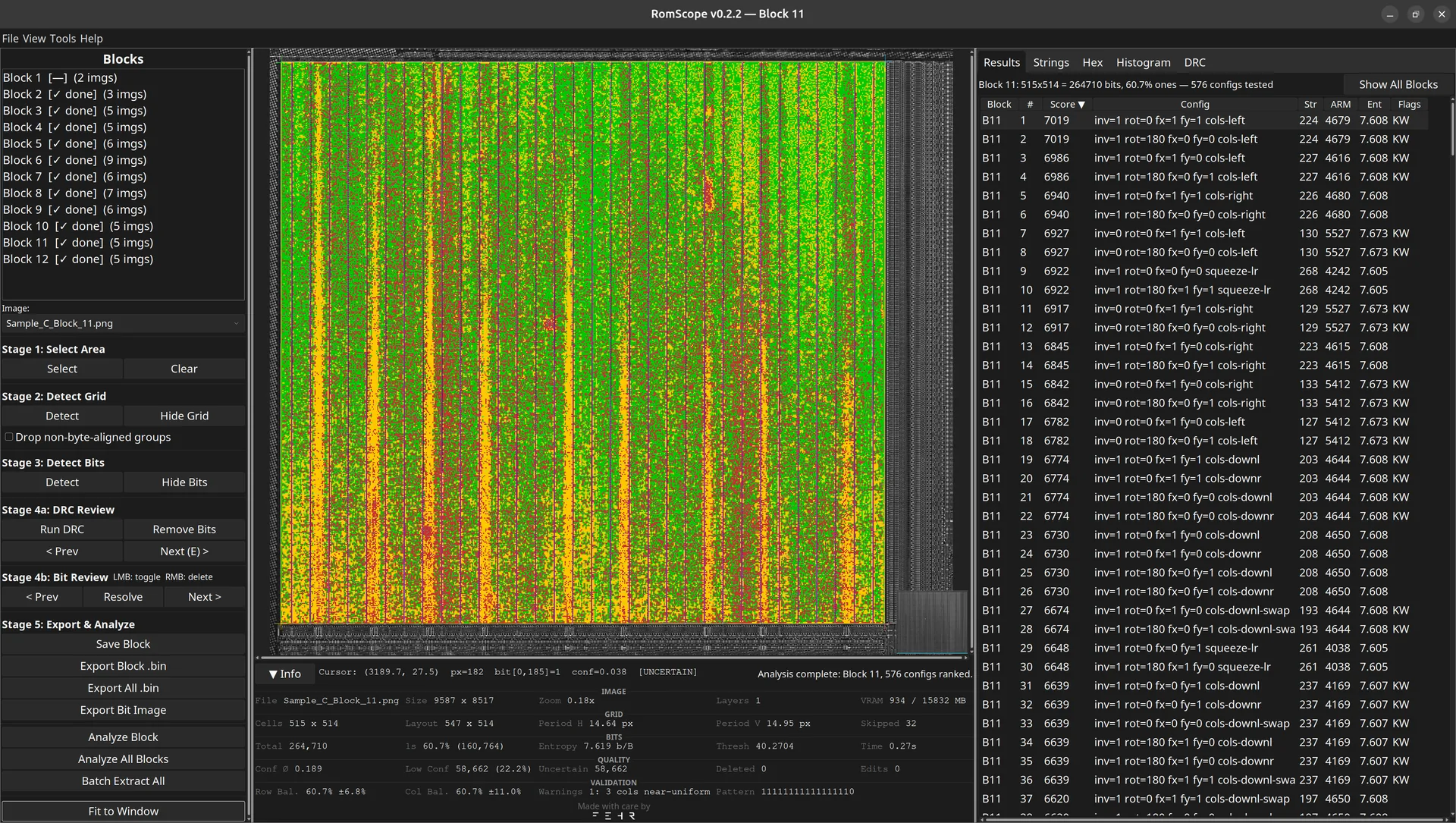
Every transform (invert, rotate, mirror) across 26 bit-order decoders. Identical outputs are merged; results ranked by entropy and known patterns.

Pattern Search & Disassembly

Find reset vectors, file headers and strings across decodings. ARM, Thumb and ARM64 disassembly — click an instruction to see its bits on the die.

Reference Comparison

Diff an extraction against a known dump or another block. Every mismatching bit is listed and marked on the image.

Batch Processing

Process all ROM blocks in a project directory. Automatic grid detection and bit extraction across the entire die.

Full Undo / Redo eval

Every bit toggle, deletion, and grid edit is tracked. Full history navigation with Ctrl+Z / Ctrl+Shift+Z.

Variable-Gap Layouts eval

Non-uniform column groups, horizontal row dividers, and metal trace filtering. Beyond simple uniform grids.

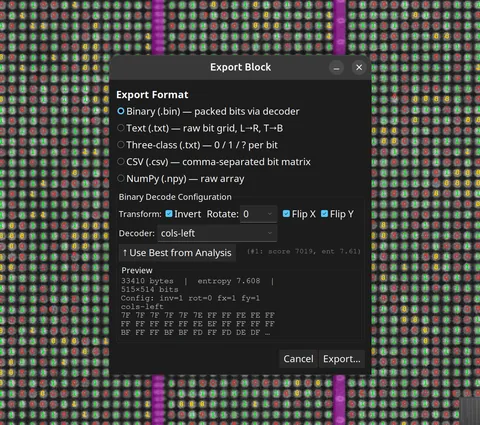
Flexible Export

Export as .bin (with decoder selection), .npy, ASCII, three-class 0/1/unknown, or full-resolution composite images with bits and findings.

In Action

From die photo to verified bits

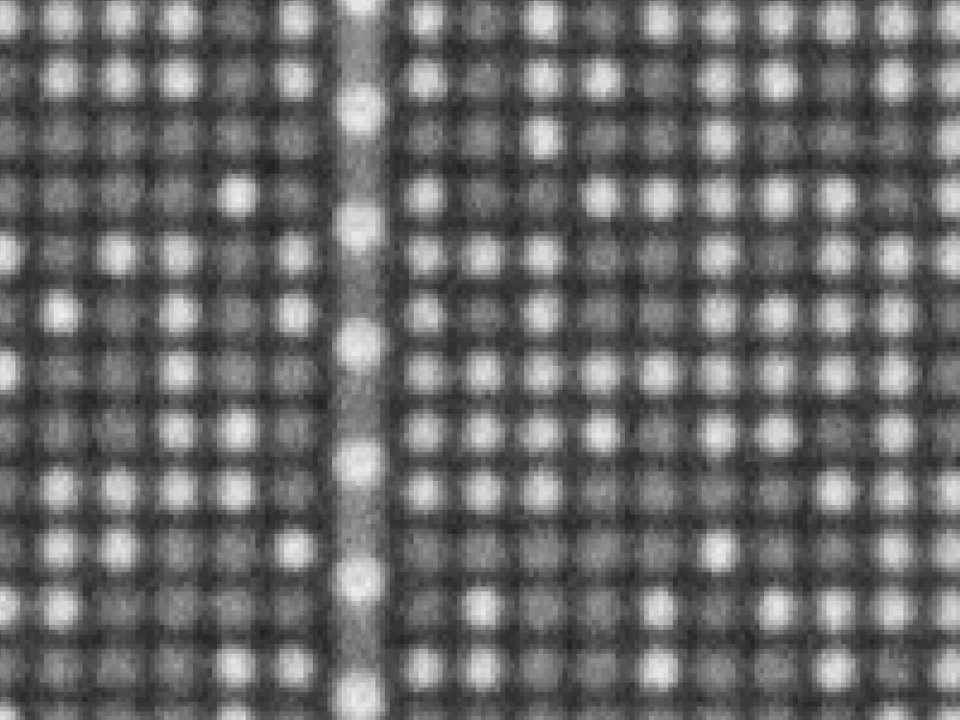
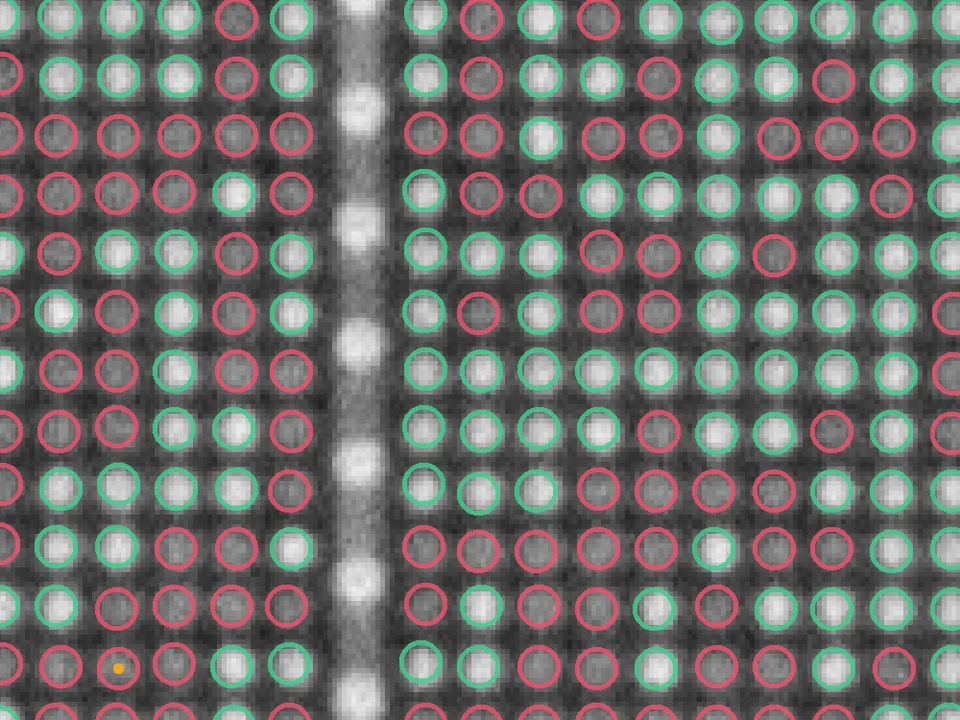
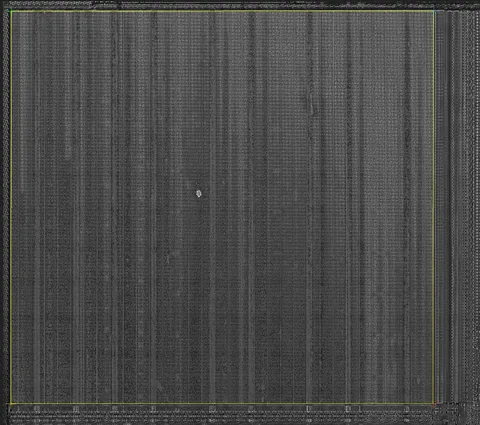
Real captures of a 512 × 512 mask ROM block, straight from the application.

SEM capture of a mask ROM block showing columns of bit cells
Input: SEM capture of the exposed ROM layer — one of several captures of the same block.
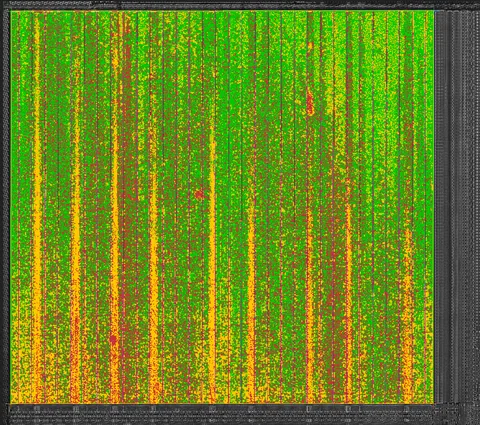
The same area with every bit classified: green rings for 1, red rings for 0, orange dots for uncertain bits
Output: Every bit classified — green 1, red 0 — with uncertain bits flagged in orange for review.
The review reticle next to the capture quality table and the selected bit shown in each capture with its vote
Review: Each uncertain bit shown in every capture, with per-capture votes and agreement scores.
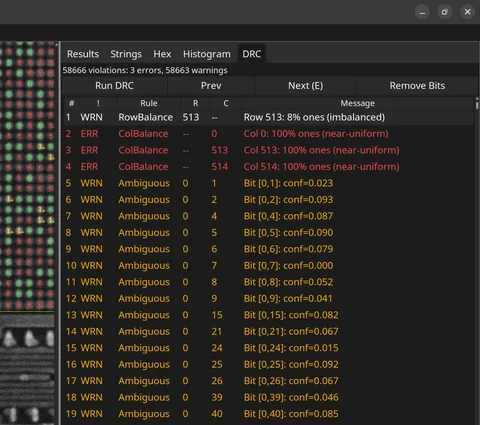
Design rule check findings listed in the analysis pane, with the selected column marked on the image
Validation: Design rule checks list suspicious rows and columns and mark them on the die.
Workflow

Five stages. Full ROM.

A guided stage-by-stage workflow from raw SEM image to decoded binary.

01

Place Corners

Click four corners of the ROM area on one capture. The other captures are aligned to it.

02

Detect Grid

FFT-based detection finds every row, column and divider with sub-pixel refinement.

03

Extract Bits

GPU classification of every bit, fused across all captures with per-bit confidence.

04

Review

Step through uncertain bits row by row and decide on the reticle while comparing every capture — or accept clear capture majorities in one step.

05

Check & Decode

Design rule checks, decode ranking, pattern search, disassembly and export.

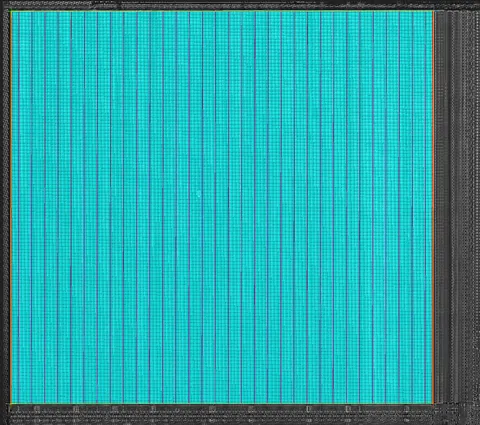
Stage 1: Grid pane with capture selection and corner placement
Stage 2: Detected grid with bits on the die
Stage 3: A whole 512 by 512 block extracted
Stage 4: The review reticle around an uncertain bit
Stage 5: Design rule check findings
Comparison

How RomScope compares

Feature comparison against existing open-source tools.

Feature RomScope Bitract Rompar MaskRomTool
Grid Detection
Automatic grid ✓ FFT + sub-pixel ✕ Manual polygon ✕ Manual clicks ✕ Manual lines
Perspective correction ✓ 4-corner quad ✕ ✕ ~ Tilt aligner
Variable-gap columns ✓ ~ Pattern arrays ✕ ✕
Row divider detection ✓ Auto + verify ✕ ✕ ✕
Bit Extraction
GPU acceleration ✓ CUDA / PyTorch ✕ ✕ ✕ OpenGL view only
Confidence scoring ✓ Per-bit ~ Threshold warnings ✕ ~ Ambiguous flag
Multi-image fusion ✓ Confidence-weighted ✕ ✕ ~ ASCII diff
Flat-field correction ✓ ~ Multipliers ✕ ✕
Analysis & Decode
Decode configurations ✓ 832, auto-ranked ✕ ✕ ~ 5 via GatoROM
Interleaved decoders ✓ 26 algorithms ✕ ✕ ~ 5 algorithms
String / keyword search ✓ 100+ keywords + byte patterns ✕ ✓ Hex search ✕
ARM disassembly ✓ ARM / Thumb / ARM64 ✕ ✕ ~ External
Hex view linked to image bits ✓ ✕ ✓ ✕
Platform
License Free eval / edu + Commercial BSD-2 GPL-2 GPL
Cross-platform ✓ Win / Mac / Linux ~ Windows ✓ ✓
Actively maintained ✓ 2026 ✕ 2019 ✕ 2020 ✓
System Requirements

Runs anywhere. Flies with a GPU.

RomScope works on CPU-only systems but delivers peak performance with CUDA-capable hardware.

Recommended Specs

OSWindows 10/11, Ubuntu 22.04+, or macOS 13+
CPU8+ cores / 16 threads (AMD Zen 3 / Intel 12th+)
RAM16–32 GB
GPUNVIDIA with 4+ GB VRAM and CUDA 12.0+
(e.g. RTX 3060 or better)
StorageSSD recommended for large image sets
Display1920 × 1080 or higher
FallbackCPU-only mode works without GPU — slower but fully functional

Reference Benchmark — RTX 5080 / 24 cores

System24-core x86_64, 16 GB VRAM, CUDA 13.0
FFT grid detect12.9 ms per 10K×9K image (90 MP)
GPU convolution68 ms — 1,315 MP/s (10K×9K)
Bit classify0.88 ms for 131k bits — 150 Mb/s
Decode (832 cfg)182 ms — 4,575 configs/s (128×128 block)
Bit packing0.008 ms for 512×512
Peak VRAM721 MB on 90 MP image
Built-in benchmark: Run romscope --benchmark to measure your system. Tests include FFT grid detection, GPU/CPU convolution, bit classification (131k bits at ~150 Mb/s), the full 832-configuration brute-force decode, and decode ranking of a 512×512 block.
Licensing

Start free. Scale when ready.

Full evaluation access with no registration and no time limit. Upgrade for export, analysis, and batch automation.

Evaluation
Free
No license needed
  • Full GUI with GPU extraction
  • Automatic grid detection
  • Bit overlay and reticle review
  • Side-by-side capture comparison
  • DRC validation
  • Histogram visualization
  • Full undo / redo
Download
Educational
Free
Universities & research
  • All Solo features included
  • Export, analysis, decoder
  • Multi-image fusion
  • Project save / load
  • Unlimited seats
  • Proof of affiliation required
Apply
Commercial Team
€2,200
Per seat / year (min 3)
  • Everything in Solo
  • Batch multi-block processing
  • 3–10 seats per license
  • Priority support (24h SLA)
  • 24% volume discount
Get Quote
Commercial Site
€18,000
Per org / year, unlimited seats
  • Everything in Team
  • Unlimited seats
  • CLI / headless automation
  • API integration
  • Dedicated support
Get Quote
Government
Custom
Annual contract
  • Everything in Site
  • Offline / air-gapped activation
  • Audit logging
  • Export control documentation
  • 24h SLA + custom NDA
Contact Us
Get Started

Ready to extract?

Download the free evaluation. No registration, no time limit. Need commercial features? Request a license.

Download coming soon.